
Discover the 5 best budget projectors for 2026, whether you want a cheap Roku unit for a bedroom or a 1080p model for the living room. Every pick streams on its own or takes a phone, and the list runs from a 720p pocket projector with a battery to a 500 ANSI lumen Google TV model. Below you will find built-in apps, Bluetooth audio, HDMI inputs and long-life LED lamps, with the tradeoffs between brightness, size and price spelled out.
Key Takeaways
- Built-in streaming matters most at this price: three of the five picks run Roku TV or Google TV without a stick, and the D1 air has the main apps built in.
- Native 1080p starts with the D1 air; the cheapest and smallest pick is 720p.
- Compare brightness in ANSI lumens rather than peak or marketing figures.
- Portability costs brightness, so the lightest model here is also the dimmest.
- HDCP restrictions can still block some apps over some connections, so check before you buy.
| Aurzen EAZZE E1R Roku TV Mini Projector | 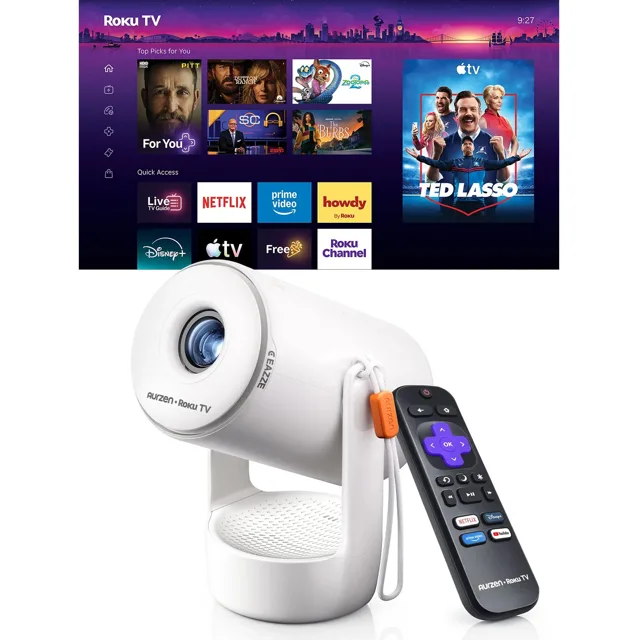 | Best for Roku | Streaming: Roku TV built in | Wireless: Wi-Fi, Bluetooth 5.2, AirPlay | Picture: 20-120 in, 1.12:1 throw | View Latest Price | Read Our Analysis |
| Aurzen EAZZE D1 air Smart Projector | 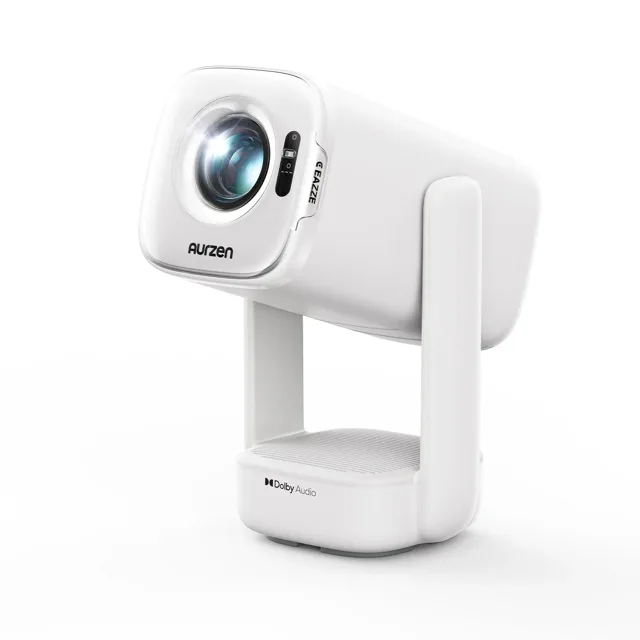 | Best all-round 1080p | Resolution (native): 1920x1080 | Brightness: 300 ANSI lumens | Picture: 40-120 in | View Latest Price | Read Our Analysis |
| Aurzen EAZZE D1G Google TV Projector | 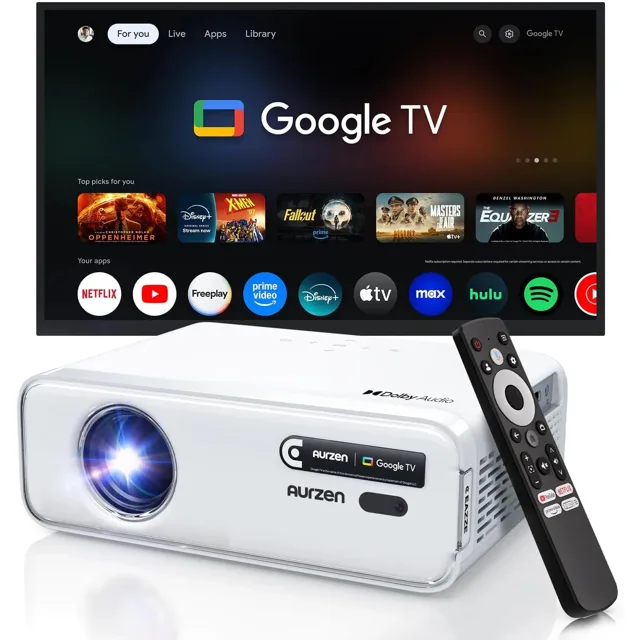 | Best Google TV pick | Resolution (native): 1920x1080 | Brightness: 200 ANSI lumens | Streaming: Google TV built in | View Latest Price | Read Our Analysis |
| Aurzen ZIP Tri-Fold Mini Projector | 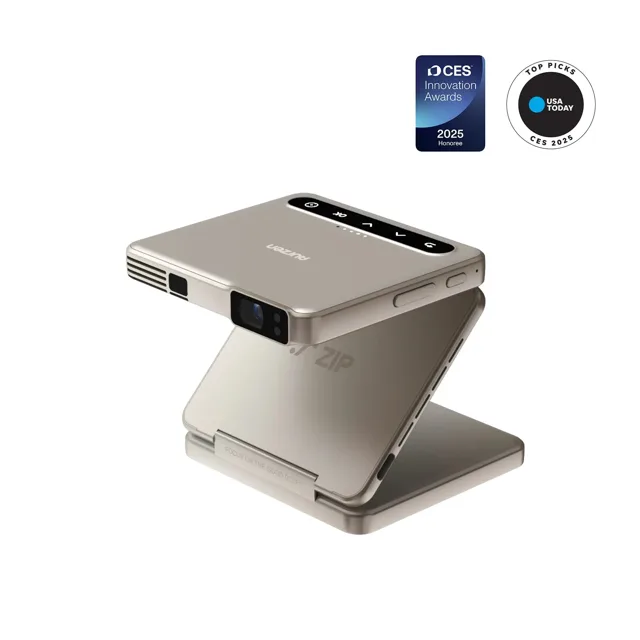 | Most portable | Resolution: 720p | Brightness: 100 ANSI lumens | Battery: 5000 mAh, 280 g | View Latest Price | Read Our Analysis |
| Aurzen BOOM mini Google TV Projector | 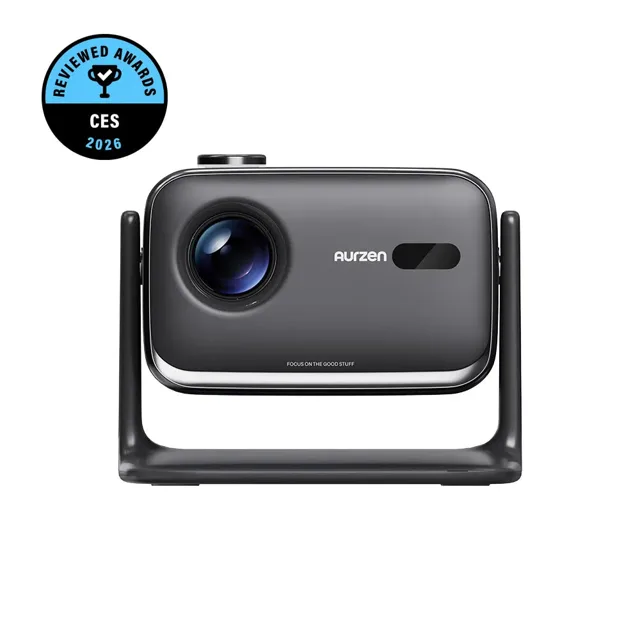 | Brightest pick | Resolution (native): 1920x1080 | Brightness: 500 ANSI lumens | Picture: 40-200 in | View Latest Price | Read Our Analysis |
More Details on Our Top Picks
Aurzen EAZZE E1R Roku TV Mini Projector
The E1R is the cheapest way to get a projector with the apps already inside it. Roku TV is built in, so there is no stick to plug in and no input to switch; you sign in once and the home screen holds Netflix, Prime Video, Hulu, YouTube, The Roku Channel and Apple TV. The maker notes that a Roku account and an internet connection are needed to activate it.
The maker lists a stand that rotates 180 degrees, a 1.12:1 throw ratio for a 20 to 120 inch picture, auto vertical keystone correction and a top focus wheel. Wi-Fi, Bluetooth 5.2 and Apple AirPlay cover sending picture and sound from a phone, and the whole unit is listed at under a pound, which is why it suits a bedroom, a dorm or a garden wall.
- Streaming:Roku TV built in
- Wireless:Wi-Fi, Bluetooth 5.2, Apple AirPlay
- Picture:20-120 in at a 1.12:1 throw
- Keystone:Auto vertical correction, manual focus wheel
- Stand:Built-in, rotates 180 degrees
- Weight:Under 1 lb
- Warranty:1 year
Aurzen EAZZE D1 air Smart Projector
The D1 air is the middle of the range and the one to pick if you want a proper 1080p panel without paying for a laser. It uses an LCD display with HDR10, native 1920x1080 and a listed 300 ANSI lumens, and the maker gives a picture from 40 to 120 inches at a throw distance of 3.7 to 18.6 ft.
Setup is mostly automatic: TOF autofocus, real-time auto keystone, manual four-point correction and 50 to 100 percent zoom for a wall that is not square to the seat. Netflix, Prime Video and YouTube are built in, two 8W speakers handle Dolby Audio, and the USB-C port takes a 65W PD supply, so a power bank can run it. It weighs 2.1 kg, which makes it a stay-at-home unit rather than a pocket one.
- Display:LCD, native 1920x1080, HDR10
- Brightness:300 ANSI lumens
- Image size:40-120 in
- Focus and keystone:TOF autofocus, real-time auto keystone, 4-point manual
- Audio:2 x 8W with Dolby Audio
- Ports:HDMI, USB, USB-C, 3.5mm out
- Power:USB-C PD 65W, power bank compatible
- Weight:2.1 kg
Aurzen EAZZE D1G Google TV Projector
The D1G is the Google TV version of the same body, and it suits a household already using Google accounts and cast targets. Google TV is built in, so the apps live on the projector, and the maker lists native 1920x1080, 200 ANSI lumens and an LED light source.
Focus and keystone are both auto with electric and manual adjustment over them. Audio comes from two 8W speakers with Dolby Audio support, and the back panel carries HDMI, two USB ports, an AV input and a 3.5mm audio out. It measures 9.1 by 6.9 by 3.2 inches and weighs 4.4 lb, and the maker includes a one year warranty, extended by a year with registration.
- Display:LCD, native 1920x1080, LED light source
- Brightness:200 ANSI lumens
- System:Google TV built in
- Focus and keystone:Auto, with electric and manual adjustment
- Audio:2 x 8W, Dolby Audio
- Ports:HDMI, 2 x USB, AV, 3.5mm out
- Size:9.1 x 6.9 x 3.2 in, 4.4 lb
- Warranty:1 year, plus 1 with registration
Aurzen ZIP Tri-Fold Mini Projector
The ZIP is the one to carry. It is a DLP projector the maker describes as tri-fold, at 84 by 78 by 26 mm and 280 g, with a 5000 mAh battery and USB-C PD charging, so it does not need a socket for a film. The trade is brightness and resolution: the maker lists 720p and 100 ANSI lumens.
It focuses and corrects keystone automatically, has two 1W speakers, Bluetooth 5.4 and a 1.09:1 throw ratio. Content comes from screen mirroring rather than built-in apps, and the maker lists Android, Windows, iOS and macOS as the devices it mirrors, with no Wi-Fi network needed between phone and projector. Controls run through the AurzenHub app or the buttons on the body.
- Display:DLP, 720p
- Brightness:100 ANSI lumens
- Size and weight:84 x 78 x 26 mm, 280 g
- Battery:5000 mAh, USB-C PD charging
- Focus and keystone:Auto
- Audio:2 x 1W, Bluetooth 5.4
- Input:Screen mirroring from Android, iOS, Windows, macOS
- Warranty:1 year, plus 1 with registration
Aurzen BOOM mini Google TV Projector
The BOOM mini is the brightest of the five at a listed 500 ANSI lumens, which is the one to look at if the room is not dark in the evening or you want a picture out in the garden. It uses an LCD panel with native 1920x1080, a 1000:1 contrast ratio and a picture from 40 to 200 inches at 1.2 to 6 m.
Google TV is built in with a MediaTek MT9630 processor, 2GB of RAM and 16GB of storage, so apps install on the projector itself. Autofocus and keystone both work in real time, the two 10W speakers cover audio, and connectivity is dual-band Wi-Fi and Bluetooth 5.1 with HDMI and two USB ports. A rotary knob on the body doubles as a second set of controls beside the remote.
- Display:LCD, native 1920x1080, LED light source
- Brightness:500 ANSI lumens, 1000:1 contrast
- Image size:40-200 in at 1.2-6 m
- System:Google TV, 2GB RAM and 16GB storage
- Focus and keystone:Real-time autofocus and keystone
- Audio:2 x 10W
- Wireless:Dual-band Wi-Fi, Bluetooth 5.1
- Ports:HDMI, 2 x USB, 3.5mm out
Factors to Consider When Choosing Budget Projectors
When you pick a budget projector, prioritize the price-to-performance balance to get the most value for your needs. Consider brightness for your space, native resolution, and connectivity options to ensure clear images and easy setup. If portability matters, weigh size and weight against potential compromises in features like lens shift or built-in audio.
Price-To-Performance Balance
Striking the right price-to-performance balance means weighing native resolution and brightness against lamp life and maintenance costs. A strong balance hinges on native 1080p clarity with solid lumens, often beating upscaling models that rely on cheaper panels. Look for long lamp life and efficient LED or laser light sources to keep running costs down over time. Built-in audio quality and wireless features can cut extra purchases, which is where a projector like the BOOM mini earns its price. Compatibility with common inputs (HDMI, USB, mobile adapters) and no need for an external streaming device lower the total cost of ownership. Beware HDCP restrictions or content-lock limitations, as they can require extra gear or limit usable content, eroding price-to-performance gains.
Brightness For Space
Consider how much ambient light your space gets, and pick brightness accordingly. Higher ANSI lumens yield brighter images and better visibility in a lit room, and the difference shows fastest in a room with windows or lamps on. Remember true brightness is ANSI lumens, not peak or marketing figures, so you can compare real performance reliably. For outdoor or daytime use you need far more headroom than for a dark bedroom, and a screen helps more than a lamp swap. Brightness also interacts with contrast and color accuracy; a lower-brightness model with strong contrast can look crisper than a brighter one with poor contrast. LED and laser sources offer steady brightness over time, but may have lower peak lumen ratings than lamp-based models.
Native Resolution Value
Native resolution is the actual pixel count your projector uses, not something it upscales from. When you evaluate budget models, prioritize native 1080p or higher to keep text sharp and details clear at larger screen sizes. A higher native resolution delivers crisper 2D content and truer color fidelity than lower-native options at the same viewing distance. Be cautious of advertised higher resolutions that rely on upscaling; true native 4K means 3840x2160 pixels or more, not merely enhanced detail from a lower base. For consistent image quality across varied content, choose models with genuine 1080p or higher native resolution. This helps ensure clearer presentations, readable menus, and more accurate color, avoiding softness or blur that can appear with native or interpolated lower resolutions.
Connectivity Versatility
Ever wonder how many ways you can connect a budget projector to your devices? Look for models with multiple inputs (HDMI, USB, and AV) to maximize compatibility with phones, tablets, laptops, and TV sticks. Wireless mirroring, like Chromecast or Wi-Fi, lets you share screens without cables, while Bluetooth audio can cut extra adapters but will not mirror video. Built-in smart features (Android TV, Google TV, or Roku) can replace external streaming gear, though they may impose HDCP content restrictions on some apps. For wired setups, HDMI adapters or MHL support are essential for iOS devices (Lightning to HDMI) or Android (micro USB or Type-C to HDMI). Also check compatibility notes for cinema or streaming restrictions to avoid blocked content on popular services.
Portability And Size
Portability and size are top priorities when you are choosing a budget projector. Lightweight models are the ones you can move between rooms or pack for a trip without thinking about it, and the ZIP here is the extreme case at under 300 g. Compact dimensions keep you bag-friendly for quick trips. These portable units favour travel-friendly form factors suited for home use, outdoor events, and fast setup without bulky stands. A smaller profile can limit internal components and battery options, and it usually trades away brightness and resolution. If portability drives your choice, expect a lighter footprint without sacrificing basic versatility.
Lamp Life Longevity
Lamp life longevity matters because it directly affects how often you will replace the lamp and what you will pay over time. When you are budgeting, treat the maker's hours rating as a rough guide to total cost of ownership rather than a promise. Longer lamp life means fewer replacements and lower maintenance costs, which matters for budget projectors you rely on for movies, presentations, or gaming. LED and laser light sources generally outlast traditional metal halide lamps, offering higher longevity with steadier overall brightness. Note that high lamp life often preserves brightness for most of its life, but you may notice gradual dimming as hours accumulate. Remember that manufacturer ratings are averages; real-world life varies with usage patterns, brightness settings, and environmental conditions.
Content Availability Options
When you are budgeting for a budget projector, you will want to think about how you will access content. Some projectors include built-in streaming apps, while others need external devices like TV sticks or Chromecast to reach services. HDCP restrictions can block content from Netflix, Prime Video, and Hulu if you use certain connections or apps, so check compatibility before buying. Official licenses or pre-installed apps simplify access without extra gear. For wired setups, you may need HDMI adapters or data-capable cables to mirror content from phones or laptops. Wireless mirroring options (AirPlay, Chromecast, or Bluetooth streaming) vary by model and may not let you select protected content. Balance ease of access with device compatibility to match your viewing habits.
Frequently Asked Questions
Do These Projectors Require an External Speaker?
Some do, some do not. Check each model's specs; every pick here has built-in speakers, but several older or smaller budget projectors rely on external audio. If sound matters, a soundbar or a pair of speakers will still beat the little drivers inside a mini projector.
How Bright Is Suitable for Daytime Use?
Brighter than you need at night, and more than most budget models deliver. Daylight needs a lot of output to stay visible, so for a sunny room plan on a bright model plus a screen, or close the blinds. A dim projector can still be perfectly watchable in the evening.
Can They Mirror or Cast From Phones Easily?
Yes, you can mirror or cast from most phones easily. Many budget projectors support AirPlay, Chromecast, or Miracast, plus HDMI or USB-C input. Just enable screen mirroring on your phone and select the projector as the destination.
What Is the Typical Lamp/LED Life Expectancy?
Long enough that most people never replace a light source. LED projectors are rated for many thousands of hours, and the practical limit is usually the rest of the electronics or the fan rather than the lamp. Check the figure the maker publishes for the model you are considering, since it varies widely.
Do They Support 4K Content Natively?
Some do support 4K natively; others upscale to 4K. Check native 4K specs, input options, and firmware updates to ensure your content plays at true 4K pixels rather than just near-native quality.
Budget Projectors With HDMI
Every pick on this page has an HDMI input, and all five also take USB. HDCP restrictions and the need for adapters can still affect streaming from Netflix, Prime or Hulu over some connections, so check the app's requirements before you buy. If you plan to plug in a console or a laptop, HDMI is the simplest route, and a longer cable saves moving the projector.