
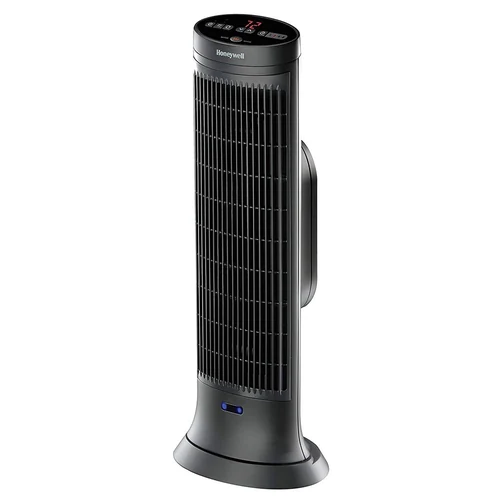
Honeywell HCE323V Review: Motion Sensor Ceramic Tower
As an Amazon Associate, this website earns from qualifying purchases.
The Honeywell HCE323V is a 1,500-watt ceramic tower heater built for medium to large rooms. It stands 23.15 inches tall, uses wide-range oscillation to push heat across the room, and carries a programmable digital thermostat with an LCD, a 1-8 hour auto-off timer, two heat settings and a remote that stores on the unit. What sets it apart from a plain tower heater is the Safety Motion Sensor on the front: if a curtain, piece of furniture or pet gets too close, the heater shuts off and starts again once the object is removed. Honeywell also lists 360-degree tip-over protection, overheat protection and a cool-touch housing, and covers the heater with a 3-year limited warranty.
Key Takeaways
- 1,500 watts of ceramic heat in a slim 23.15-inch tower, designed for medium to large rooms.
- The front Safety Motion Sensor shuts the heater off when an object gets too close and restarts it when the object is removed.
- Digital controls with an LCD and a programmable thermostat, plus two heat settings: Max Heat and Energy Saver.
- A 1-8 hour auto-off timer and an included remote, with a storage area on the unit.
- 360-degree tip-over protection, overheat protection and cool-touch housing, backed by a 3-year limited warranty.
Honeywell HCE323V Motion Sensor Ceramic Heater
The HCE323V is the motion-sensor model in Honeywell's HCE300 series of ceramic tower heaters. Ceramic heaters draw air in through the back, pass it over a heated ceramic element and push it out warm, which is the technology behind the even heat Honeywell describes for this unit. The tower body measures 8.7 by 6.69 by 23.15 inches and weighs 4.72 pounds, so it can be lifted by the built-in handle and moved between rooms. It comes in dark grey, has a permanent dust filter and is aimed at medium to large spaces such as living rooms, master bedrooms and home offices.
Immediate Heat Distribution
The 1,500-watt ceramic element is paired with wide-range oscillation. Instead of warming one spot, the tower sweeps the heated air across the room, which is how Honeywell describes its whole-room heating. That makes the HCE323V a fit for a room where the heater has to cover more than the area directly in front of it, and it is why the maker lists the unit for medium to large rooms rather than desks or single seats.
Honeywell also gives it two heat settings, Max Heat and Energy Saver, so the output can be matched to the room rather than run flat out all the time.
Detailed Features
Here is what Honeywell lists for the HCE323V:
- Heating: 1,500-watt ceramic element with two settings, Max Heat and Energy Saver.
- Coverage: designed for medium to large rooms, with wide-range oscillation.
- Controls: digital controls, an LCD temperature display and a programmable thermostat.
- Timer: a 1-8 hour auto-off timer.
- Motion sensor: a Safety Motion Sensor on the front that shuts the heater off when an object gets too close and resumes once it is removed.
- Safety: 360-degree tip-over protection, overheat protection and cool-touch housing.
- Remote: included, with a storage area on the heater.
- Filter: a permanent dust filter.
- Size and weight: 8.7 by 6.69 by 23.15 inches, 4.72 pounds, dark grey, with a carrying handle.
- Warranty: 3-year limited warranty.
Advantages and Disadvantages Overview
The case for the HCE323V rests on the safety sensor. Most tower heaters rely on a tip-over switch and overheat cut-off alone; this one adds a sensor that reacts to something being placed too close, which is the kind of thing that happens in a busy living room. The programmable thermostat, the timer and the remote make it easier to set a temperature and leave it alone, and the slim tower takes up little floor space.
The trade-offs come with the design. It is a corded 1,500-watt appliance, so it needs a free outlet and is aimed at one room at a time rather than a whole house. The motion sensor deliberately pauses the heat when an object is near, which is a safety gain but can interrupt warming in a cramped spot. The remote is small enough to misplace, which is why Honeywell moulded a storage slot into the unit, and the heater offers no app or smart-home control. None of these are faults; they are the shape of the product.
Ideal for Quick, Cozy Warmth
The HCE323V suits a living room, a master bedroom or a home office where the goal is to warm the occupied room rather than the whole house. Honeywell's setup advice is to place it on a firm, level, open surface at least 3 feet from a wall or anything combustible, and to keep it off bedding and deep carpet. The permanent filter should be cleaned regularly; Honeywell's manual recommends doing it at least once a month and before the heater goes into storage. Because the tower oscillates and carries a handle, it can be moved from the office to the bedroom as the day moves on.
Frequently Asked Questions
How does the safety motion sensor work?
Honeywell puts the Safety Motion Sensor on the front of the unit. If an object such as a curtain, a piece of furniture or a pet gets too close, the sensor detects it and automatically shuts the heater off. The heater resumes operation once the object is removed.
Can I program the temperature?
Yes. The HCE323V has a programmable thermostat with a digital display. You set the temperature you want and the heater cycles on and off to hold it, using either the Max Heat or Energy Saver setting.
Does it come with a remote control?
Yes. A remote is included, and it adjusts the temperature, timer and heat settings from across the room. There is a storage area on the unit for the remote when it is not in use.
How much area can this tower heater cover?
Honeywell designs it for medium to large rooms. The 1,500-watt ceramic element and wide-range oscillation are meant to distribute heat evenly across a large area, and the slim profile lets it sit in a corner or along a wall.
My HCE323V shuts off unexpectedly. What should I do?
Honeywell says to check for obstructions first. Turn the heater off and unplug it, let it cool completely, then remove the obstruction. Wait at least 10 minutes before plugging it back in and following the operating instructions.